
How to Fix JavaScript Rendering for AI Crawlers: SSR, SSG, and Pre-rendering Guide
AI crawlers don't execute JavaScript. If your site is client-side rendered, ~35% of the web's problem, here's how to fix it with SSR, SSG, ISR, or pre-rendering.
Why is my JavaScript site invisible to AI search engines?
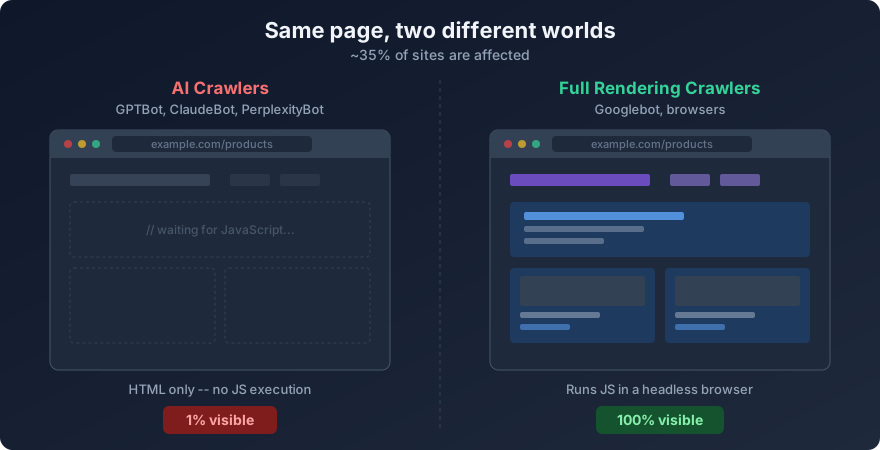
About 35% of websites serve their content through client-side JavaScript rendering. That content loads fine in a browser. Google can see it -- Googlebot runs headless Chrome and executes your React, Vue, or Angular code. But GPTBot, ClaudeBot, and PerplexityBot don't execute JavaScript. They read raw HTML. If your content lives inside a <div id="root"></div> that only fills in after JavaScript runs, AI crawlers see an empty page.
This is the part that gets me. A site can score 100% crawlability for Google while showing 1% AI content visibility. Your rankings look fine. Traditional search traffic is stable. But you're absent from ChatGPT citations, Perplexity answers, and Claude responses. And you probably don't know it because nothing in your analytics tells you.
Here's the fastest way to check: open your site, right-click, and select "View Page Source" (not "Inspect Element" -- that shows the DOM after JavaScript runs). If you see your actual text content in the source HTML, you're fine. If you see mostly empty <div> tags, script bundles, and a loading spinner, AI crawlers are seeing that too.
You can also run curl -s https://yoursite.com | head -100 in a terminal. That shows exactly what a non-JS crawler receives.
What is server-side rendering and how does it fix this?
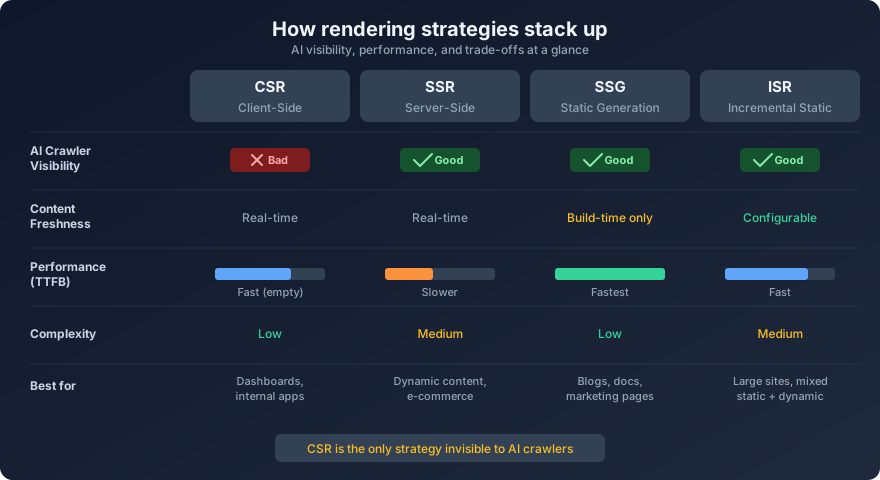
Server-side rendering (SSR) generates the full HTML for a page on the server before sending it to the browser. When GPTBot requests your URL, it gets a complete HTML document with all your text, headings, and structured data already present. No JavaScript execution needed.
The visitor's browser still hydrates the page into a full interactive app after the HTML loads. You keep your React or Vue components, your client-side routing, your dynamic features. The difference is that the first response from your server contains real content instead of an empty shell.
Most modern JavaScript frameworks support SSR out of the box:
Next.js (React) -- SSR is the default behavior for pages. Use
getServerSidePropsin the Pages Router or server components in the App Router.Nuxt (Vue) -- Ships with SSR enabled by default. Set
ssr: trueinnuxt.config.ts(it's already on unless you turned it off).SvelteKit (Svelte) -- SSR is on by default. Every route renders on the server unless you explicitly disable it with
export const ssr = false.Remix (React) -- SSR only. Every route has a loader that runs on the server. No client-only rendering mode.
Angular Universal -- Add
@angular/ssrto your Angular project. Requires more setup than the others, but it's officially supported.
The cost: every request hits your server. That adds 50-200ms of latency for the render pass and requires a Node.js runtime. You can't just throw files on a CDN. For most sites, that's a fine trade. But if you have high-traffic pages with content that rarely changes, there's a cheaper way.
When should I use static site generation instead?
Static site generation (SSG) builds all your pages into plain HTML files at build time. No server-side rendering on each request -- the HTML already exists as a file. A CDN serves it directly. It's the fastest possible delivery and gives AI crawlers exactly what they need: complete HTML.
SSG works well when your content doesn't change per-request. Blog posts, documentation, marketing pages, product catalogs that update on a schedule -- all good candidates. If your page shows different content based on the logged-in user or changes every few seconds, SSG won't work.
Framework support:
Next.js -- Use
getStaticProps(Pages Router) or static generation in the App Router. AddgenerateStaticParamsfor dynamic routes.Nuxt -- Run
nuxi generateto pre-render all routes to static HTML.SvelteKit -- Use the
@sveltejs/adapter-staticadapter or setexport const prerender = trueon specific routes.Gatsby (React) -- Built entirely around SSG. Every page is pre-rendered at build time.
Astro -- Static by default. Outputs zero JavaScript unless you explicitly opt in with
client:directives.
The downside is build times. A site with 10,000 product pages might take 20+ minutes to build. Every content update means a full rebuild and redeploy. If you have thousands of pages that change often, that cycle gets painful fast.
What is Incremental Static Regeneration?
ISR is my favorite answer to the "SSR or SSG?" question because it mostly sidesteps it. Pages are pre-built as static HTML, but they revalidate in the background after a time interval you set. When a visitor requests a page that's older than the revalidation window, they get the cached version instantly while the server rebuilds it in the background. The next visitor gets the fresh version.
Next.js introduced ISR and it remains the most mature implementation. In the Pages Router, add a revalidate property to getStaticProps:
export async function getStaticProps() {
  const products = await fetchProducts();
  return {
    props: { products },
    revalidate: 3600 // Rebuild this page every hour
  };
}
In the App Router, use the revalidate export or fetch options:
// app/products/page.tsx
export const revalidate = 3600;

export default async function ProductsPage() {
  const products = await fetch('https://api.example.com/products');
  // ...
}
Nuxt 3 supports a similar pattern with routeRules in nuxt.config.ts:
export default defineNuxtConfig({
  routeRules: {
    '/products/**': { isr: 3600 }
  }
})
ISR works well for e-commerce catalogs, news sites, and anything where content changes but not on every single request. The AI crawler always gets pre-rendered HTML. The HTML is at most one revalidation interval old -- usually acceptable for crawlers that visit every few days.
What if I can't switch my rendering strategy?
Sometimes you're locked into a client-side rendered SPA. Maybe it's a large legacy codebase, maybe there's no budget for a migration, maybe the app relies heavily on client-side state that doesn't translate to SSR. Pre-rendering services exist for this situation.
The concept: a service runs a headless browser, loads your SPA, waits for JavaScript to finish, captures the resulting HTML, and caches it. When a bot requests your page, your server detects the bot's user-agent and serves the pre-rendered HTML. Human visitors get the normal SPA.
Options to consider:
Prerender.io -- A hosted service. You add middleware to your server that checks user-agents and redirects bot requests to Prerender.io's cached HTML. Pricing starts around $9/month for 250 pages.
Rendertron -- Google's open-source headless Chrome rendering solution. You self-host it and configure your server to proxy bot requests through it. Free, but you manage the infrastructure.
Puppeteer/Playwright scripts -- Roll your own. Write a script that visits your pages with Puppeteer, saves the HTML, and serve those files to bots. Maximum control, maximum maintenance burden.
Caveats matter here. Pre-rendered content can go stale if your cache refresh interval is too long. If the pre-rendered version differs significantly from what users see, Google may consider it cloaking -- a violation of their guidelines. Keep the pre-rendered content identical to what JavaScript produces for users. Don't add hidden keywords or different content for bots.
I want to be direct about this: pre-rendering is a stopgap. It adds operational complexity and another thing that can break at 2am. If you're starting a new project or doing a major refactor, just pick SSR or SSG from the start and skip this whole layer.
How does dynamic rendering work?
Dynamic rendering is a Google-documented approach where your server detects whether the request comes from a bot or a browser, then serves different responses. Bots get a fully rendered HTML page (from a renderer like Rendertron or Puppeteer). Browsers get the normal SPA.
Google's documentation at developers.google.com supports this approach for sites that rely on client-side rendering. It's not cloaking as long as the content is the same. You're delivering identical information in a different format depending on who's asking.
A basic implementation with Express.js:
const botUserAgents = [
  'googlebot', 'bingbot', 'gptbot',
  'claudebot', 'perplexitybot', 'ccbot'
];
app.use((req, res, next) => {
  const ua = req.headers['user-agent']?.toLowerCase() || '';
  const isBot = botUserAgents.some(bot => ua.includes(bot));
  if (isBot) {
    // Serve pre-rendered HTML
    return servePrerendered(req, res);
  }
  next(); // Serve normal SPA
});
Add the AI-specific user agents to your bot detection list. Most dynamic rendering setups only check for Googlebot and Bingbot. That's the exact gap we're talking about -- your dynamic rendering might already work for Google while leaving AI crawlers in the dark.
Google has called dynamic rendering a "workaround," not a long-term solution. They recommend SSR instead. I agree with that advice. But when you need something working by Friday while you plan a real migration, dynamic rendering is the pragmatic choice.
How do I test my AI content visibility?
Four methods, from simplest to most thorough:
1. View Page Source. In any browser, right-click your page and select "View Page Source." Search for a distinctive paragraph from your content. If it's there, bots can see it. If it's missing, your content is JavaScript-only.
2. curl from the command line. Run curl -s https://yoursite.com/important-page and look for your content in the output. This is exactly what a basic crawler receives. For a more realistic AI crawler simulation, add a user-agent header: curl -s -H "User-Agent: ClaudeBot" https://yoursite.com/important-page.
3. Disable JavaScript in your browser. In Chrome DevTools, open Settings (F1), scroll to "Debugger," and check "Disable JavaScript." Reload your page. What you see is what non-JS crawlers see. Don't forget to re-enable it.
4. Run GenReady's AI readiness analyzer. Go to genready.ai, enter your URL, and look at the AI Content Visibility score. The tool checks what AI crawlers specifically can access, including your robots.txt rules per bot, whether your content renders without JavaScript, and whether you have Schema.org markup (only 12.4% of sites do). It catches issues that manual testing misses.
What are the quick fixes for each framework?
Next.js (React)
If you're using the App Router (Next.js 13+), your components are server components by default. Content renders on the server unless you add 'use client' at the top of a file. Check that your main content pages don't have unnecessary 'use client' directives.
If you're on the Pages Router, add getServerSideProps or getStaticProps to pages that need AI visibility. A page without either function renders client-side only.
// pages/about.tsx -- before (client-only)
export default function About() {
  const [data, setData] = useState(null);
  useEffect(() => { fetch('/api/about').then(r => setData(r)); }, []);
  return <div>{data?.content}</div>;
}
// pages/about.tsx -- after (SSR)
export async function getServerSideProps() {
  const data = await fetch('https://api.example.com/about');
  return { props: { data: await data.json() } };
}
export default function About({ data }) {
  return <div>{data.content}</div>;
}
Nuxt (Vue)
Nuxt has SSR on by default. If your content isn't rendering server-side, check nuxt.config.ts for ssr: false and remove it. If certain pages use ClientOnly components for main content, move that content outside the ClientOnly wrapper.
For data fetching, use useAsyncData or useFetch composables instead of client-side onMounted fetch calls. These run on the server during SSR:
// Before (client-only fetch)
onMounted(async () => {
  const data = await $fetch('/api/products');
});
// After (SSR-compatible)
const { data } = await useFetch('/api/products');
Angular
Add Angular SSR to your project: ng add @angular/ssr. This sets up Express-based server-side rendering. After installation, build with ng build and serve with node dist/your-app/server/server.mjs.
Watch for code that accesses window, document, or localStorage directly -- these don't exist on the server. Wrap browser-only code in platform checks:
import { isPlatformBrowser } from '@angular/common';
import { PLATFORM_ID, inject } from '@angular/core';
const isBrowser = isPlatformBrowser(inject(PLATFORM_ID));
if (isBrowser) {
  // Browser-only code here
}
React SPA (Create React App / Vite)
If you're running a pure React SPA with no framework, you have three options. First, migrate to Next.js -- this is the recommended path and the React team's official guidance as of 2024. Second, add a pre-rendering service like Prerender.io. Third, use react-snap or a similar tool to pre-render your routes at build time into static HTML.
For react-snap, install it and add to your build script:
npm install react-snap
// package.json
"scripts": {
  "postbuild": "react-snap"
}
This crawls your built app and saves the rendered HTML for each route. It's not as robust as framework-level SSR, but it's the fastest path to getting content into your HTML source.
Vue SPA (without Nuxt)
Same situation as React SPA. The best path is migrating to Nuxt. If that's not possible, use a pre-rendering plugin like vite-plugin-prerender for Vite-based projects, or configure a pre-rendering service.
For Vite projects:
// vite.config.ts
import prerender from 'vite-plugin-prerender';
export default defineConfig({
  plugins: [
    vue(),
    prerender({
      routes: ['/', '/about', '/products', '/contact'],
    })
  ]
});
What should I do right now?
Start with the test. Open "View Page Source" on your most important page. If you see your content, you're ahead of 35% of JS-heavy sites. If you don't, here's the priority order:
If you're starting a new project, pick a framework with SSR built in. Next.js, Nuxt, SvelteKit, Remix. Don't start with a client-only SPA if AI visibility matters to you.
If your existing framework already supports SSR, turn it on. For most frameworks this is a config change, not a rewrite. The framework-specific sections above walk through the details.
If you're stuck with a legacy SPA you can't migrate, add a pre-rendering service like Prerender.io this week. Set up dynamic rendering as a medium-term fix. Plan the real migration when budget allows.
And regardless of your rendering setup, add Schema.org markup. Only 12.4% of sites have it. Structured data helps AI crawlers parse your content even when they can access the HTML. There's a real difference between "here's some text" and "here's a Product with a price of $49, a 4.3 star rating, and 12 units in stock."
Most websites haven't adapted to AI crawlers yet. That's actually good news for you -- the bar is low and the fixes are straightforward. A week of work now puts you ahead of the 35% of sites that are still completely invisible to AI search.
Want to know exactly how AI crawlers see your site? Run a free AI readiness scan at genready.ai and get your visibility score in under 60 seconds.