
Agent Cards Explained: The Two JSON Files That Make Your Site Discoverable to AI Agents
MCP server cards and A2A agent cards let AI agents discover your services in one request. Who needs them, what goes in them, and the three ways cards go wrong.
AI agents do not browse directories to find services. They fetch a well-known URL, read a JSON card, and decide in one request whether your site is worth talking to. Two cards matter in 2026: the MCP server card at /.well-known/mcp/server-card.json and the A2A agent card at /.well-known/agent-card.json. The A2A ecosystem behind the second one passed 150 production organizations in April, per the Linux Foundation.
Each card takes about 30 minutes to publish. Whether you need one takes about two minutes to figure out. Here is both.
What is an MCP server card?
An MCP server card announces that you run a Model Context Protocol server and tells AI clients how to connect. It lives at /.well-known/mcp/server-card.json (some deployments use mcp.json).
MCP is the plumbing that lets AI clients like Claude call your tools: search your catalog, query your API, open a support ticket. Without a card, every user configures your server by hand, pasting URLs into settings. With a card, a client can discover your server from your domain alone and connect automatically, including OAuth discovery for authenticated access.
If you built an MCP server and skipped the card, you built a shop and skipped the sign.
What is an A2A agent card?
An A2A agent card describes your agent to other agents: what it can do, where its endpoint is, what auth it expects. It lives at /.well-known/agent-card.json and it is the front door of the Agent2Agent protocol.
A2A hit v1.0 in April 2026 and is governed by the Linux Foundation, with 150+ organizations running it in production and general availability inside Microsoft Copilot Studio, Azure AI Foundry, and Amazon Bedrock AgentCore. v1.0 also added signed cards, so an agent reading your card can verify it actually came from you rather than an impersonator.
The distinction between the two cards is simple. MCP connects agents to tools. A2A connects agents to other agents. Same discovery pattern, different audience.
How does discovery actually work?
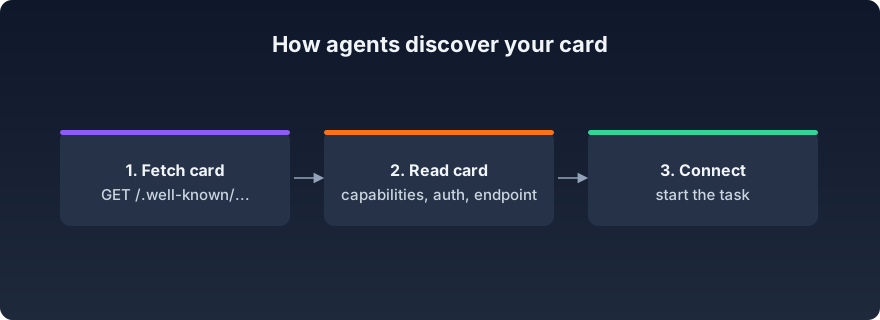
One GET request, then a decision.
An agent that wants something from your domain fetches the well-known URL. The card tells it your capabilities, endpoint, and auth requirements. If there is a match, it connects and starts working. No card means no discovery: your server might be excellent, but agents cannot find what you never advertised.
This is the same well-known-file pattern the rest of the agent stack uses, from x402.json to Web Bot Auth key directories. The agent readiness stack guide maps all of them.
Does your site need these cards?
Only if you run the thing the card advertises. This is the rare agent readiness item with a clean yes/no rule.
You run an MCP server: publish a server card today. It is the difference between manual setup and automatic discovery, and it costs half an hour.
You expose an agent that other agents should reach: publish an A2A agent card, and sign it, since v1.0 verification is what stops impersonation.
You run neither: skip both. A card pointing at nothing helps nobody and can mislead agents into probing endpoints that do not exist. Spend the time on schema markup and markdown negotiation instead.
What goes in a card?
The minimum MCP server card is small: a name, a description, an endpoint URL, and auth hints. A skeleton:
{
  "name": "Acme Catalog",
  "description": "Search and order from the Acme product catalog",
  "endpoint": "https://api.acme.com/mcp",
  "auth": { "type": "oauth2" }
}
The A2A card carries more: capabilities, skills, supported message types, and in v1.0 a signature block. Both specs publish full schemas, and both validate in minutes.
What can go wrong with a card?
Three failure modes show up in real scans, and all three are cheap to avoid.
Stale cards are the most common. Teams publish a card, then move the endpoint or change auth, and the card keeps advertising the old world. Every agent that reads it now fails at connection time, which looks worse than having no card. Treat the card like API documentation: update it in the same commit that changes the endpoint.
Unparseable JSON is the silliest. A trailing comma or an unquoted key means agents read nothing at all, and nothing on your site will warn you. Validate the file in CI or check it after every edit.
Unsigned A2A cards are the emerging one. Since v1.0, agents can verify a card's signature before trusting it. An unsigned card still works, but as signed cards become the norm, verifying agents will prefer peers they can authenticate. The same trust push is happening one layer down with Web Bot Auth, where agents cryptographically sign their requests; the stack guide covers how the two fit together.
The general rule: a card is a promise about your infrastructure. Keep the promise current, parseable, and provable.
GenReady's analyzer checks both locations on every scan. The checks are bonus-only: a valid card adds a point, a missing one never subtracts. We also verify OAuth discovery on MCP cards and flag cards that fail to parse.
Not sure if your cards are visible and valid? Run a free GenReady scan — it checks both well-known paths in under 60 seconds.