
What AI Crawlers Can't See on Your Site
AI bots do three jobs: training, search indexing and user fetches. Here is which user agent does each job at OpenAI, Anthropic, Perplexity, Google and Apple, which ones run JavaScript (most do not), and what robots.txt should allow if you want AI citations.
In one month of late 2024, GPTBot made 569 million requests across Vercel's network and Anthropic's crawler made 370 million. None of those crawlers ran the JavaScript they fetched. Vercel and MERJ published the numbers in December 2024. If your text is not in the raw HTML, these bots never read it.
The bots also do different jobs. At OpenAI alone, GPTBot collects training data, OAI-SearchBot builds the index behind ChatGPT search, and ChatGPT-User fetches a page when someone asks about it. If you want AI citations, your robots.txt has to tell these apart.
What is an AI crawler?
An AI crawler is a program that fetches web pages for an AI company. It requests your URL, reads the HTML response, and passes the text on to a training set, a search index or a live answer. The volume is already large. On Vercel's network, GPTBot and Anthropic's crawler together made about 20% as many requests as Googlebot's 4.5 billion in the same month.
Which AI bots train, which index, and which fetch for a user?
Each major vendor now runs a separate user agent for each job, and blocking one does not block the others. The figure gives the summary view. The table below lists each token the way the vendor documents it, checked on 21 October 2026. Each AI vendor runs a separate bot for each job.
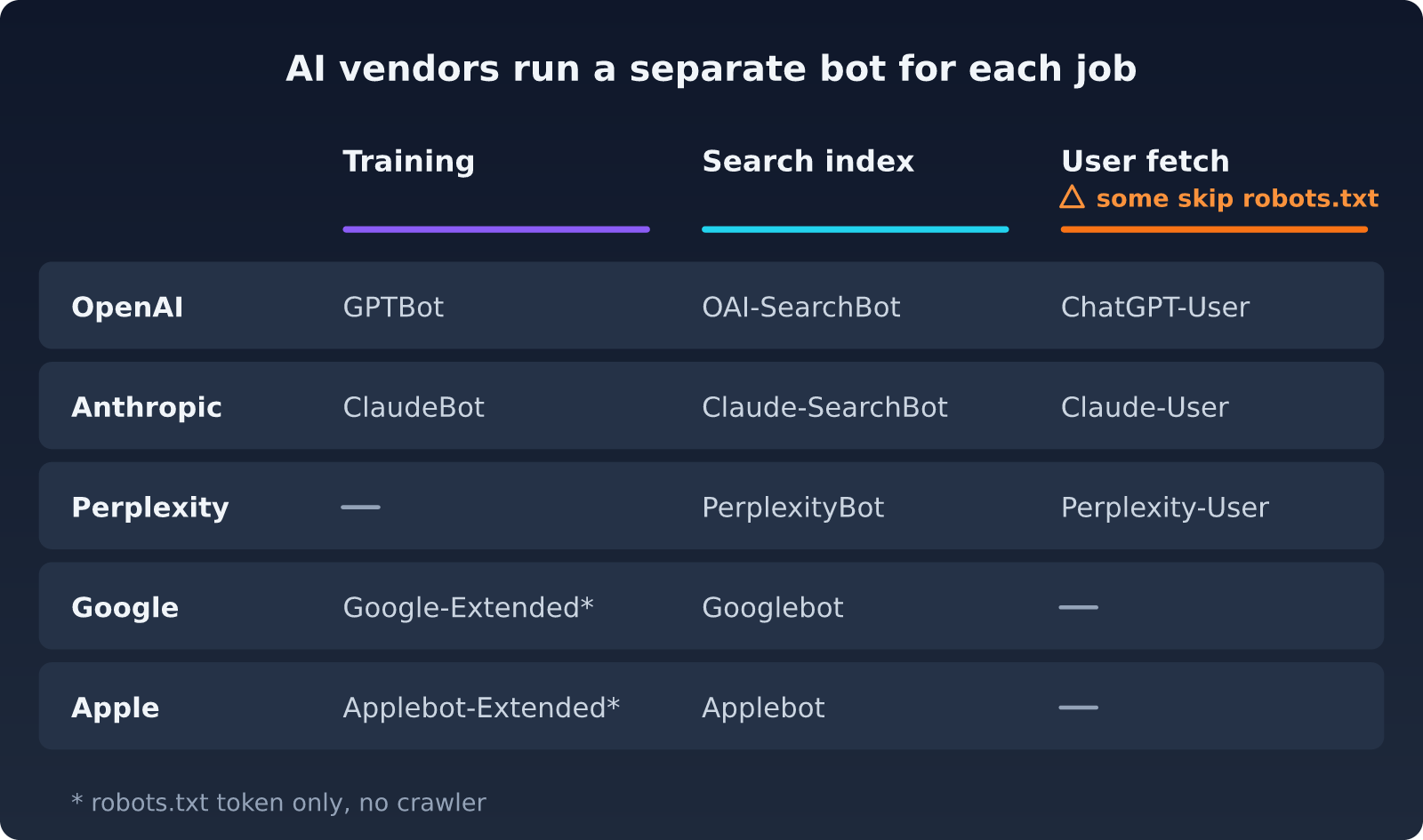
Sources: crawler docs from OpenAI, Anthropic, Perplexity, Google, Apple and Common Crawl. The JavaScript column comes from Vercel and MERJ (December 2024) and Bing (October 2019).
Two tokens catch people out. Google-Extended and Applebot-Extended are robots.txt tokens, not crawlers. Google says Google-Extended "does not impact a site's inclusion in Google Search." AI Overviews and AI Mode draw on the normal Search index, so Googlebot access and snippet eligibility decide whether you appear there. Apple says pages that disallow Applebot-Extended "can still be included in search results."
User fetchers play by looser rules. OpenAI says robots.txt rules "may not apply" to ChatGPT-User, because a person started the request. Perplexity says Perplexity-User "generally ignores robots.txt rules." Anthropic says a block on Claude-User stops Claude from fetching your pages for user queries.
Search bots decide citations. OpenAI states that sites opted out of OAI-SearchBot "will not be shown in ChatGPT search answers," and that a robots.txt change takes about 24 hours to apply. Anthropic warns that blocking Claude-SearchBot may reduce your visibility in Claude's search results. Perplexity says PerplexityBot surfaces and links sites in its answers and is not used to train foundation models.
Which bots should robots.txt allow if you want AI citations?
Allow the search bots and the user fetchers. Block the training bots only if you want your content kept out of future models. With OpenAI, Anthropic and Apple, a training block leaves search and citations untouched, because each job has its own token.
Google-Extended is the exception. It also controls grounding in the Gemini apps and Vertex AI, so a block can keep your pages out of Gemini app answers. Google Search and AI Overviews stay unaffected.
In the sample below, the training group is commented out, so every bot can read the site by default. Remove the # signs only if you decide to opt out of training.
# Search and user fetchers: allow, for citations
User-agent: OAI-SearchBot
User-agent: ChatGPT-User
User-agent: Claude-SearchBot
User-agent: Claude-User
User-agent: PerplexityBot
User-agent: Perplexity-User
Allow: /
Disallow: /admin/

# Training: optional opt-out. Remove the leading "# " to use it.
# User-agent: GPTBot
# User-agent: ClaudeBot
# User-agent: CCBot
# User-agent: Applebot-Extended
# Disallow: /
#
# Google-Extended controls Gemini training AND grounding in the
# Gemini apps and Vertex AI. Add it to this group only if you
# accept that Gemini app answers may stop citing your pages.
# User-agent: Google-Extended# Everyone else, including Googlebot, bingbot and Applebot
User-agent: *
Allow: /
Disallow: /admin/Sitemap: https://example.com/sitemap.xml
Watch one trap. Under RFC 9309, the robots.txt standard, a bot that matches a named group ignores the User-agent: group completely. Copy your path rules, such as Disallow: /admin/, into every named group. Our help page on bot access rules covers more edge cases.
How does an AI crawler turn your page into an answer?
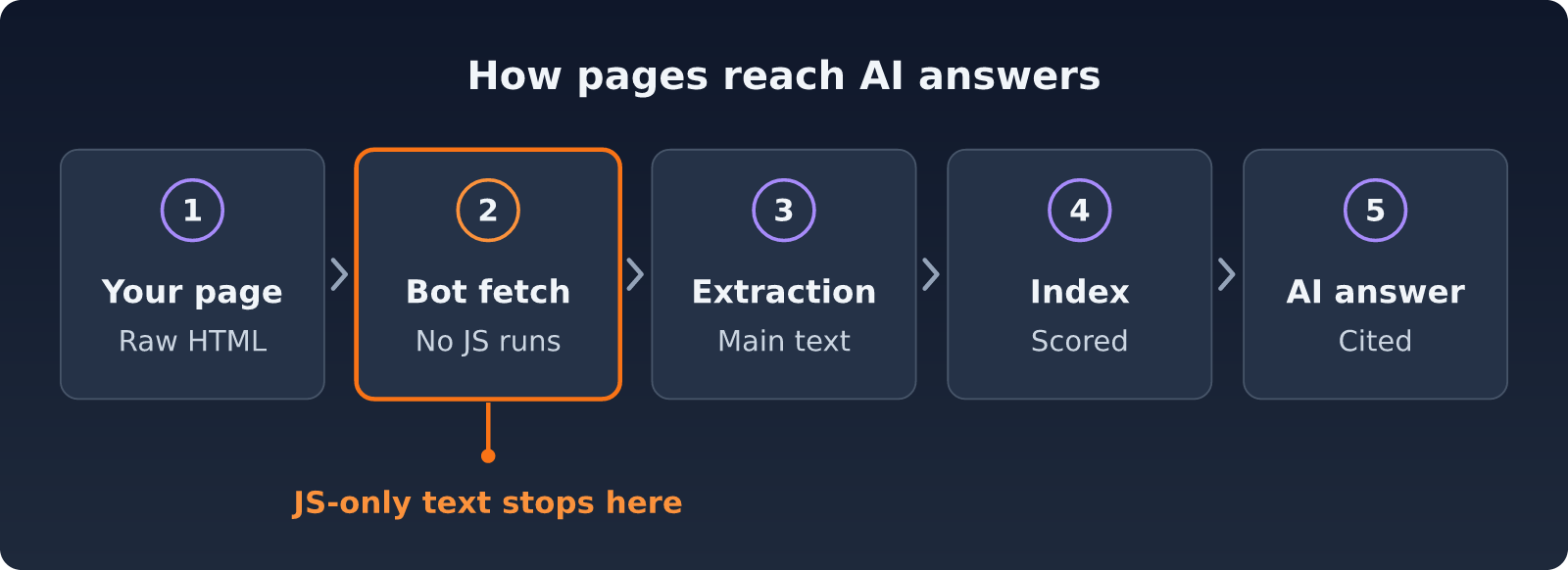
The path has five steps. Your server sends HTML, the bot fetches it, an extractor pulls out the main text, an index scores and stores it, and an answer engine cites it. Text that needs JavaScript drops out at the fetch step.
Five steps from your HTML to an AI answer. Text that needs JavaScript is lost at step 2.
Vendors do not publish their extraction or scoring code. Steps 3 and 4 are our working model, based on how open-source extractors such as trafilatura and Mozilla Readability behave. What vendors and outside tests have shown is narrower: what the bots fetch, and that most of them do not run scripts.
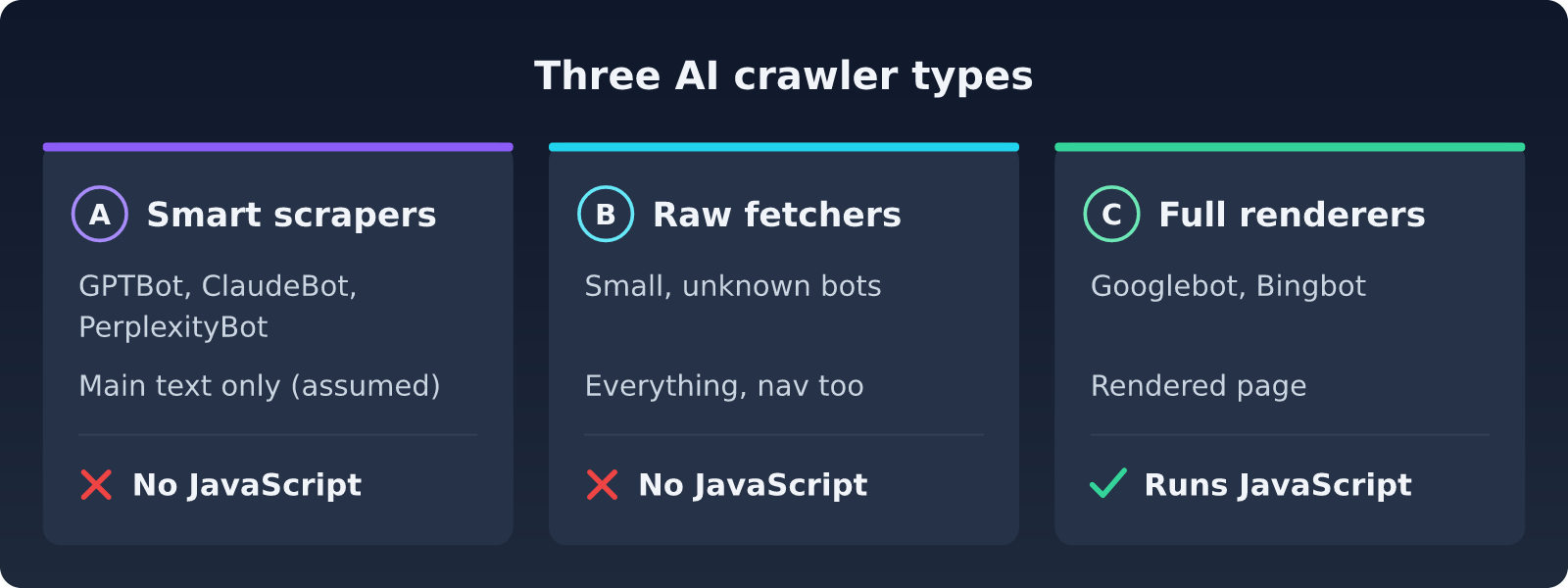
Our working model of three crawler types. The JavaScript column is measured. The split between smart scrapers and raw fetchers is our assumption, because vendors do not publish how they extract text.
Small and unidentified bots may skip extraction and keep the text of every tag, navigation and cookie banners included. We have not measured that. Semantic elements such as <main> and <article> help in either case.
Do AI crawlers run JavaScript?
Most did not when last measured. Vercel and MERJ's December 2024 test found that "none of the major AI crawlers currently render JavaScript." The test covered GPTBot, OAI-SearchBot, ChatGPT-User, ClaudeBot, PerplexityBot, Meta-ExternalAgent, Bytespider and CCBot.
The bots do download script files. JavaScript files made up 11.50% of ChatGPT's crawler requests and 23.84% of Claude's. The bots never execute that code, so any text the scripts would build stays invisible.
Googlebot renders pages, and Vercel found that Gemini uses Googlebot's infrastructure. Applebot renders through a browser-based crawler. Bingbot has rendered with Microsoft Edge since Bing's "evergreen Bingbot" update in October 2019. Claude-SearchBot, Claude-User and Perplexity-User were not part of the Vercel test, so we treat them as non-rendering until someone measures them.
"AI crawlers, while rapidly scaling, continue to face significant challenges in handling JavaScript."
Ryan Siddle, Managing Director of MERJ, in Vercel's "The rise of the AI crawler," December 2024
On 21 October 2026 we checked three public pages that build their text in the browser. Each page got one curl request with GPTBot's user agent and one load in headless Chromium. The raw HTML held zero words of visible text on all three. After JavaScript ran, the Docsify quick start page showed 552 words, the Swagger UI Petstore demo 270 and the Redoc demo 125.
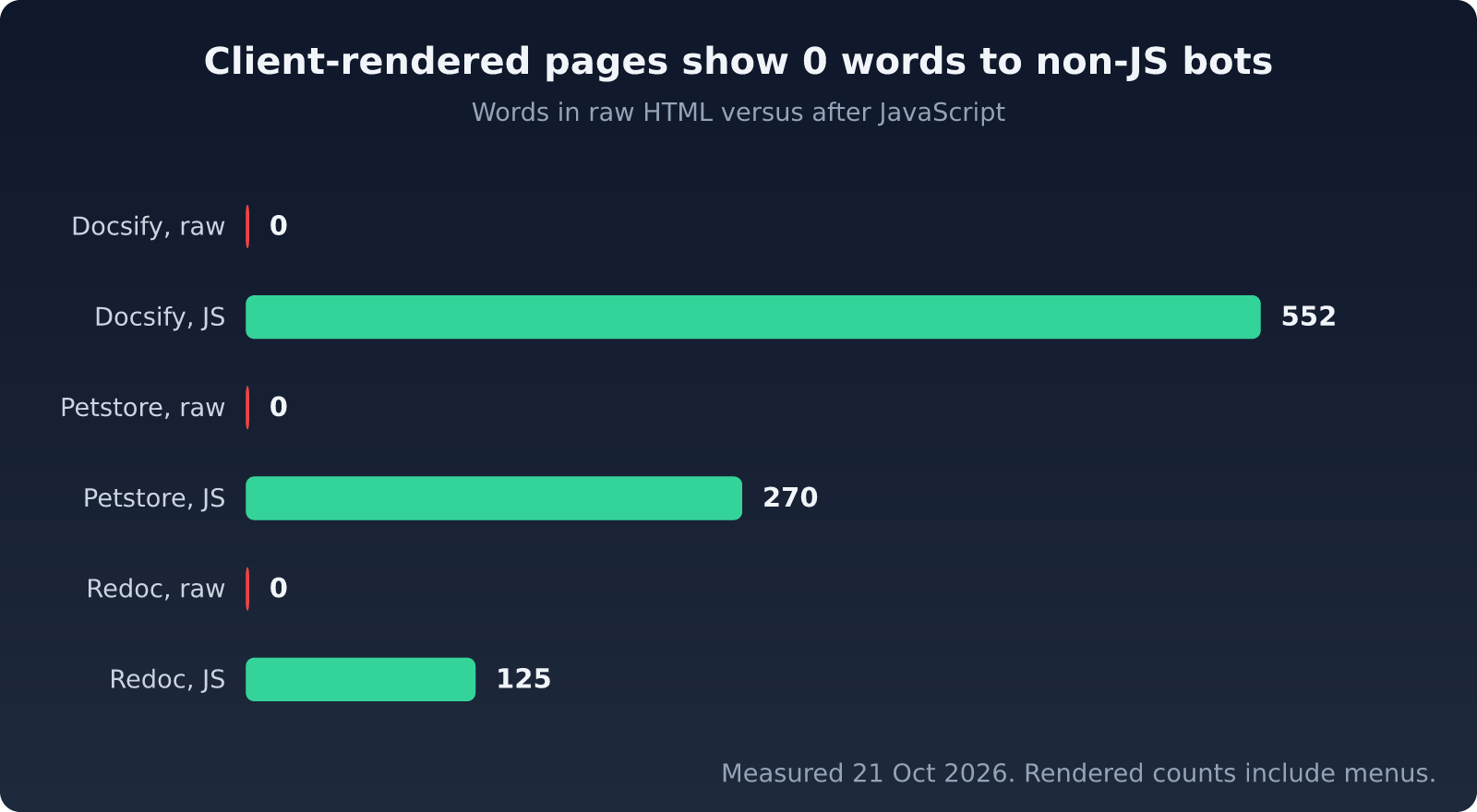
Visible words in the raw HTML and after JavaScript, measured 21 October 2026 on docsify.js.org/#/quickstart, petstore.swagger.io and redocly.github.io/redoc. Rendered counts include menus.
Googlebot does render, so a site like this can rank well in Google and still be missing from ChatGPT and Claude answers. Strong Google rankings say little about AI visibility.
How can you check what an AI crawler sees?
Fetch the page without JavaScript and count the words. Run this in a terminal:
curl -sL -A "Mozilla/5.0 AppleWebKit/537.36 (KHTML, like Gecko); compatible; GPTBot/1.4; +https://openai.com/gptbot" https://yourwebsite.com | perl -0pe 's/<(script|style|noscript|template)\b.?</\1>//gis; s/<!--.*?-->//gs; s/<[^>]+>/ /g' | wc -wThis fetches the raw HTML with GPTBot's user agent, removes scripts, styles and tags, and counts what is left. The title and menus count too, so treat the number as an upper bound. On our three test pages it returned 1 to 3 words, the page title. A plain grep over the same HTML also counts words inside inline scripts. It reported 485 words for the Docsify page. An earlier draft of this article used that grep, so check your own one-liners.
Use these rough thresholds for a content page. Under 50 words, bots see an empty shell. Under 200, they miss most of it. At 500 or more, the page is healthy.
View source (Ctrl+U) shows the same raw HTML. Inspect Element shows the page after scripts ran, so it will mislead you. The GenReady analyzer compares the raw HTML with the rendered page and reports the gap.
What should you fix first?
Fix access first, then rendering. A blocked bot reads nothing. An allowed bot still reads nothing from an empty shell. The table sets the order, and each step has its own section below. For a shorter reference, see our help article on how AI crawlers read your website.
#FixWhyEffort 1Allow search bots and user fetchersA blocked bot cannot cite youLow 2Render main content on the serverMost AI crawlers do not run JavaScriptMedium to high 3Use semantic, text-dense HTMLExtractors look for the main content blockMedium 4Add JSON-LD structured dataStates page type, author and dates in a fixed formatLow 5Keep an XML sitemap currentHelps crawlers find new and changed URLsLow 6Add llms.txt, Content Signals and markdownGives agents a map, your usage terms and a clean copyLow
1. Allow search bots and user fetchers
Use the robots.txt example above. Then look for a User-agent: * group with Disallow: /, which blocks every bot that has no group of its own. Check your CDN and firewall too. Cloudflare and Vercel both offer AI bot blocking rules that stop requests before robots.txt is even read.
Cloudflare made blocking the default on 1 July 2025. Since then, it asks every new domain at sign-up whether to allow AI crawlers, according to its press release. If your site joined Cloudflare after that date, check which bots the setting lets through.
2. Render main content on the server
If your text arrives through client-side JavaScript, fix that before anything else on this list. Next.js App Router pages render on the server by default, Nuxt runs SSR by default, Astro is static-first, and SvelteKit renders on the server out of the box. Vercel's study gives the same advice: render critical content with SSR, ISR (incremental static regeneration) or SSG, and keep client-side rendering for extras such as view counters and chat widgets.
Our guide How to Fix JavaScript Rendering for AI Crawlers walks through SSR, SSG and pre-rendering step by step.
3. Use semantic, text-dense HTML
Open-source extractors pick the block with the most real text. Mozilla Readability, for example, skips paragraphs shorter than 25 characters and lowers the score of blocks that are mostly links. AI vendors have not said which extractor they use, so treat this as a safe default, not a proven ranking factor.
Wrap the main content in
<main>or<article>.Keep headings in order, from
<h1>down to<h3>.Write full paragraphs instead of one-word fragments in nested divs.
Put the most important content near the top of the DOM.
4. Add JSON-LD structured data
JSON-LD states the page type, author and dates in a fixed format, so a parser does not have to guess them. Google documents that it uses structured data to understand page content. AI vendors have not published how they use it. For an article it looks like this:
<script type="application/ld+json">
{
  "@context": "https://schema.org",
  "@type": "Article",
  "headline": "Your Article Title",
  "author": { "@type": "Person", "name": "Author Name" },
  "datePublished": "2026-01-01"
}
</script>
Start with Article, Product, FAQPage, Organization and BreadcrumbList.
5. Keep an XML sitemap current
Googlebot and bingbot read sitemaps, and both feed AI answers through AI Overviews, Gemini and Copilot. OpenAI, Anthropic and Perplexity do not document whether their bots read /sitemap.xml. Keep yours current anyway and list it with a Sitemap: line in robots.txt.
AI bots waste about a third of their fetches on dead URLs. In Vercel's data, 34.82% of ChatGPT's crawler fetches and 34.16% of Claude's hit 404 pages, against 8.22% for Googlebot. Keep removed pages out of your sitemap, and redirect old URLs to their replacements.
6. Add llms.txt, Content Signals and markdown
Three agent-facing standards appeared or changed since September 2025. We would do them last. They are cheap, but none of them helps if a bot cannot read your HTML.
llms.txt is a Markdown file at /llms.txt that lists your key pages with short notes. The llmstxt.org proposal was revised to v2 in August 2026.
v2 makes three changes:
rel="describedby"points a page to the llms.txt that covers it.rel="alternate" type="text/markdown"points to a markdown copy of the page, aspage.mdorpage.html.md.An llms.txt in a subfolder now covers the pages under that folder.
llms-full.txt is a community habit, not part of the spec.
Content Signals add a Content-Signal line to robots.txt. The line states how bots may use your content: search, ai-input (retrieval and grounding for answers) and ai-train. Cloudflare published the policy in September 2025 under CC0 and added it at launch to managed robots.txt files on more than 3.8 million domains. The signals are preferences, and Cloudflare says some companies "might simply ignore them."
User-agent: *
Content-Signal: search=yes, ai-input=yes, ai-train=no
Allow: /
Place the line inside a group, after its rules. A signal at the end of the file belongs only to the last group. Our help page on Content Signals has the details.
Markdown for agents is plain HTTP content negotiation. An agent sends Accept: text/markdown, and your server returns a markdown copy of the page instead of HTML. Cloudflare launched this as Markdown for Agents on 12 February 2026 for Pro, Business and Enterprise plans. It converts up to 6 MiB of HTML at the edge.
Watch the default signal. Unless your origin sets its own, Cloudflare adds Content-Signal: ai-train=yes, search=yes, ai-input=yes to the markdown response. If you opt out of training, set your own signal at the origin.
On other hosts, add the conversion at your server and send Vary: Accept so caches keep the two versions apart. See our markdown negotiation guide.
What should you do this week?
Run the curl test on your three most important pages and compare each count with the thresholds above.
Open
/robots.txt. Confirm that OAI-SearchBot, Claude-SearchBot, PerplexityBot, Googlebot and bingbot are allowed, and that noUser-agent: *group hasDisallow: /.Check your CDN and firewall for AI bot blocking rules.
If the word count is low, server-render the main content.
Add JSON-LD to your top pages and a
Sitemap:line to robots.txt.Decide on training. Write the decision as robots.txt groups and as a
Content-Signalline.
AI crawlers read what a plain HTTP request returns. Make that response complete, and let the search bots in.
Run a GenReady scan to see which AI bots your site lets in and how much of your text they can read.